Power supplies: Difference between revisions
(→Table of power supply requirements: mention power requirement for JV-1010, add newlines) |
m (new svgs) |
||
| (21 intermediate revisions by 2 users not shown) | |||
| Line 1: | Line 1: | ||
Got a sick deal on a | Got a sick deal on a new module unit, but it won't come with a power supply? Importing a unit from a different region, and worried about what different mains voltage / frequency / adapters you may need to consider? Your power supply broke and you need a replacement? | ||
Importing a unit from a different region, and worried about different mains voltage / frequency / | |||
Your power supply broke? | |||
Fear not, this is the page for you! | Fear not, this is the page for you! | ||
| Line 9: | Line 5: | ||
== Units with DC power input == | == Units with DC power input == | ||
DC stands for "direct current" - meaning a device receives a constant, non-alternating load. | DC stands for "direct current" - meaning a device receives a constant, non-alternating load. A very common example of this are your typical every-day AAA and AA batteries. Just like those, there is a positive and a negative terminal to any DC power supply. | ||
If your device has a DC power input, then: | If your device has a DC power input, then: | ||
* The actual power supply is a separate unit, not part of the device itself - it can be replaced if needed with ease. | |||
* It is region independent. You can get a power adaptor that fits the DC specifications with ease for your region. | |||
* If the power supply breaks, or doesn't work in your region, you can normally get another power supply that is a drop-in replacement and works out of the box. | |||
* You're not stuck with a failure-prone or inefficient old power supply, as you could get a more efficient or modern replacement. | |||
=== USB bus-powered units === | |||
If the unit is USB "bus powered", that means it's powered by the USB input. This makes everything simple. Note that there are also units that have USB ports but are ''not'' powered by USB (USB for data and/or audio only). | |||
Please note that for USB type-C, power supply can be very different depending on the unit and may not always work properly, but USB-C is typically way beyond the time range covered by DTM Wiki. Just know that USB-C has additional protocols that communicate the expected power, and the power adapter (or laptop, phone, etc) acknowledges it, whereas older USB-3 or USB-2 doesn't do this and is (typically, there are exceptions) limited to 5V and 500mA. | |||
=== USB | =====Examples of USB-Powered devices===== | ||
* [[Roland-ED SC-8820]] - MIDI and power are transmitted through the same cable. | |||
* [[Edirol SD-20]] - Same as above. | |||
* [[M-Audio MIDISport series]] - Being a USB-MIDI hub, you'd expect this to be the case... | |||
=====Examples of USB devices that ''require'' external power===== | |||
* [[Roland-ED SC-8850]] - There is a USB port, but it is only used for MIDI. The unit requires a figure-8 power lead. | |||
* [[Access Virus TI]] - There is a USB port, but it is only used for audio-over-USB and MIDI. It requires a 12V DC power adapter for the desktop version, see below. | |||
=== Barrel jack === | === Barrel jack === | ||
[[File:Roland SC-7 barrel jack.jpg|200px|thumb|right|The [[Roland SC-7]] has a barrel jack.]] | [[File:Roland SC-7 barrel jack.jpg|200px|thumb|right|The [[Roland SC-7]] has a barrel jack.]] | ||
Many devices accept low-voltage DC power via a barrel jack. Barrel jacks are usually of a common type, so: | Many devices accept low-voltage DC power via a barrel jack. Barrel jacks are usually of a common type, so: | ||
* You don't need an original Roland/Yamaha/whatever power supply. You can get one from any brand, just pay close attention to the specs. | * You don't need an original Roland/Yamaha/whatever power supply. '''In fact, it is generally not a good idea to use the original adapters, as the aging components could stop functioning and potentially damage the synth.''' You can get one from any brand, just pay close attention to the specs (voltage, amps and polarity matter most here). | ||
* If it's more convenient, you can get a "universal" supply | * If it's more convenient, you can get a "universal" power supply, which allows the user to configure the output voltage, polarity, and change the plug tip to fit a specific input for not much more than a non-universal DC adapter. | ||
=====Examples===== | |||
Well, a lot of devices, really, but: | |||
* [[Roland SC-55]] - These units take center-negative, 9V DC, rated at 500mA for the mk1, and 600mA for the mk2. | |||
* [[Yamaha MU80]] - These units take center-positive 12V DC, and depending on the unit rated up to 3 amps. The MU80 here though will only require a fraction of that, at only 700mA | |||
* [[Korg 05R/W]] - These units take center-''negative'' 12V DC, rated at 400mA. | |||
* [[Access Virus TI]] Desktop - These units take center-positive 12V DC, rated at 1000mA. | |||
==== What makes a power supply compatible ==== | ==== What makes a power supply compatible ==== | ||
[[File:Barrel jack sizes.jpeg|100px|thumb|right|Some sizes of barrel plugs]] | [[File:Barrel jack sizes.jpeg|100px|thumb|right|Some sizes of barrel plugs]] | ||
The easiest way to find a compatible power supply is to check the unit itself or the manual. Usually it'll say something like "USE ABC-123 ADAPTER ONLY". You don't have to listen to the manufacturer here, but if you | The easiest way to find a compatible power supply is to check the unit itself or the manual. Usually it'll say something like "USE ABC-123 ADAPTER ONLY". You don't have to listen to the manufacturer here, but if you already have that specific adapter, that's your problem solved. Otherwise… | ||
There are four things you must get right for a DC power supply with a barrel plug, so that it works with your device: | There are four things you must get right for a DC power supply with a barrel plug, so that it works with your device: | ||
* The '''voltage''' (in volts, symbol '''V'''). For example, 9V or 12V. This should '''exactly''' match. For example, only use a 9V supply for a 9V device. | * The '''voltage''' (in volts, symbol '''V'''). For example, 9V or 12V. This should '''exactly''' match. For example, only use a 9V supply for a 9V device. | ||
* The '''amperage''' or '''current''' (in amps, symbol '''A'''). For example, 300mA (0.3A) or 500mA (0.5A). For this, the supply must provide '''at least''' as much as the device needs. So if the device needs 300mA and the supply provides 500mA, that's fine, but the reverse | * The '''amperage''' or '''current''' (in amps, symbol '''A'''). For example, 300mA (0.3A) or 500mA (0.5A). For this, the supply must provide '''at least''' as much as the device needs. So if the device needs 300mA and the supply provides 500mA, that's fine, but the reverse (500mA required, but only 300mA supplied) will not work. | ||
* The '''size''' of the barrel jack. There's a few different shapes and sizes. The plug can be a bit smaller than the hole, though it's better if you choose one you can't accidentally plug into the wrong device. | * The '''size''' of the barrel jack. There's a few different shapes and sizes. The plug can be a bit smaller than the hole, though it's better if you choose one you can't accidentally plug into the wrong device. | ||
* The '''polarity''' of the barrel jack. This is either: | * The '''polarity''' of the barrel jack. This is either: | ||
:* [[File: | |||
:* [[File: | :* [[File:Center Negative.svg|100px]] center/inside is negative ('''-'''), outside is positive ('''+''') | ||
:* [[File:Center Positive.svg|100px]] center/inside is positive ('''+'''), outside is negative ('''-''') | |||
If you see power given in watts (symbol '''W'''), that's the voltage multiplied by the amperage. | If you see power given in watts (symbol '''W'''), that's the voltage multiplied by the amperage. | ||
Be particularly careful with voltage and polarity. Getting those wrong | Be particularly careful with voltage and polarity. Getting those wrong could damage your device if it has no internal protection against it. | ||
The voltage, amperage and polarity should be clearly marked on the power supply, and on the device. If they're not on the device itself, check the manual, or (for Yamaha products) find an image of the power supply the manufacturer suggested you use. As for the size of the jack and plug, that's more of a trial-and-error thing. But to save you all this effort… | The voltage, amperage and polarity should be clearly marked on the power supply, and on the device. If they're not on the device itself, check the manual, or (for Yamaha products) find an image of the power supply the manufacturer suggested you use. As for the size of the jack and plug, that's more of a trial-and-error thing. But to save you all this effort… | ||
==== Table of power supply requirements ==== | ==== Table of power supply requirements ==== | ||
<!--Hey all, MelonadeM here: I do not think we need such a table here and should instead add a new field to the infobox dedicated to power expectations, where we can fill out the information, which would be immediately more useful. --> | |||
{|class="wikitable" | {|class="wikitable" | ||
| Line 62: | Line 75: | ||
|- | |- | ||
|Roland | |Roland | ||
|[[Roland SC-7|SC-7]] (300mA)<br>JV-1010 (430mA) | |[[Roland SC-7|SC-7]] (300mA)<ref>Roland SC-7 Owner's Manual, page 40.</ref><br>[[Roland SC-88VL|SC-88VL]] (800mA)<ref>[https://cdn.roland.com/assets/media/pdf/SC-88VL_OM.pdf Roland SC-88VL Owner's Manual], page 90.</ref><br>[[Roland JV-1010|JV-1010]] (430mA)<ref>[https://static.roland.com/assets/media/pdf/JV-1010_OM.pdf Roland JV-1010 Owner's Manual], page 89.</ref> | ||
|9V | |9V | ||
|[[File: | |[[File:Center Negative.svg|70px]] center negative | ||
|??mm (2.1mm works, 2.5mm works) | |??mm (2.1mm works, 2.5mm works) | ||
|- | |- | ||
|Yamaha | |Yamaha | ||
|QY70<br>CBX-K1XG<br>PSR-350 | |QY70<br>[[Yamaha CBX-K1XG|CBX-K1XG]]<br>PSR-350 | ||
|12V | |12V | ||
|[[File: | |[[File:Center Positive.svg|70px]] center positive | ||
|??mm | |??mm | ||
|} | |} | ||
| Line 76: | Line 89: | ||
== Units with AC power input == | == Units with AC power input == | ||
Units using AC (alternating current) for its power delivery typically have their power drawn directly from mains, | Units using AC (alternating current) for its power delivery typically have their power drawn directly from mains (in other words, the power outlet on your wall/extender). They typically have a built-in transformer section whose entire duty is to take in the raw AC out of the wall and convert it into clean direct current (DC) for the synthesizer circuitry to use without issue. | ||
Typically, AC units are considered more dangerous than DC units. There are a few reasons for this: on one hand is due to DC units containing the transformer ''outside'' the synthesizer, meaning it can be replaced with newer, more efficient parts with ease, whereas AC units would require a complete rebuild of the transformer section, often meaning replacing capacitors and other components. On the other hand, DC units always expect the same input voltage and amperage, which can be typically provided no matter what the standard output is at the wall, whereas AC units may care about being specifically configured to a region's output voltage and frequency. In short, there is way more potential for things to potentially go wrong with AC units if you're not aware of the circumstances at play, and if they do go wrong the consequences could be orders of magnitude more fatal as opposed to DC units. | |||
=== Hard-wired units === | === Hard-wired units === | ||
If your unit has a power cable that you cannot detach, that means it has a hard-wired cable. You are not able to remove the cable unless you modify the unit and fit a custom power connector inside, which, for the record, we cannot recommend as a safe alternative to using a transformer/adapter. The other annoyance is that, in regions that output a compatible voltage, but use a different plug standard (such as a UK-manufactured [[Roland U-220]] being used in Germany), an adaptor is required anyway. | |||
=====Examples===== | |||
* [[Roland SC-88]] | |||
* [[Roland U-220]] | |||
'''Please note:''' Units that are hard-wired are very likely to be permanently configured to a specific input voltage and/or frequency. Therefore it is '''NOT''' recommended to plug any of these devices straight into your wall or via a simple travel adaptor, as doing so may lead to a nasty shock. Unless the configured voltage on the unit matches the output on your electrical sockets, '''don't do it.''' '''Please also note''' that some devices allow for users to easily reconfigure the expected input voltage by soldering wires in the transformer section. '''What that means is even if the unit is claiming to be a 250 V unit, it may have been reconfigured to accept 120 V, and vice versa.''' It is heavily recommended that, if you are buying one of these devices, that communication is established with the seller to establish what the '''current''' expected standard is, and if it can be reconfigured for your region, or checking inside the unit to confirm what the expected input standard is. | |||
You | Some ways around this: | ||
* You may opt to use a step-down or a step-up transformer, depending on where the device came from and where you're trying to use it (250v to 120v would be a step down, 120v to 250v would be a step up). This typically is a last resort only used if a device cannot be reconfigured. | |||
* Modify the power supply's intake to match what your outlets supply - for example, modifying a Japanese [[Roland SC-88 Pro]], which typically expects a 100V 60hz input, to use European 250 50hz loads instead, by rewiring a connection in the transformer. | |||
* If the option is available, obtaining a closely-related device that uses DC input instead is a great way around this - for example, the [[Roland SC-88 VL]] is a smaller variant of the [[Roland SC-88]], it retains all the features, but removes some front panel controls, however it also uses a 9V DC input like the [[SC-55]] before it, as opposed to a hard-wired power lead. | |||
=== IEC 60320 devices, or in other words kettle leads (3-pin) and figure-8 leads (2-pin) === | |||
In some cases, a device leaves the power lead issue up to the user - these are sometimes hard-wired to a specific voltage inside the transformer, but are more commonly configured as "universal", meaning it can accept any territories' standard input voltage and frequency. | |||
=== Kettle leads (3-pin | ==== Kettle leads (IEC 60320 Type C13/C14) ==== | ||
[[File:IEC 3-pin.svg|100px|thumb|right|Illustration of an IEC 3-pin connector]] | |||
* Kettle leads {{IEC 3-pin Icon}} are 3-pin cables, with 2 prongs on either side of the plug, and one higher prong in the middle. You would typically see this used in desktop PC power supplies, kitchen appliances, guitar amplifiers, and more. | |||
==== | =====Examples===== | ||
* | * The [[Roland JV-1080]] features one on the rear of the unit with all the other connectors | ||
* The [[Roland XV-5080]] does the same, and also sports universal power, meaning you can use it in any region and it'll work directly off the wall. | |||
* The [[Yamaha Motif ES]] keyboards happily showcase their 3-pin connector where the other cables go. | |||
==== Figure-8 leads ==== | ==== Figure-8 leads (IEC 60320 Type C7/C8) ==== | ||
* Figure-8 leads are comparatively smaller | [[File:IEC 2-pin.svg|100px|thumb|right|Illustration of an IEC 2-pin (figure-8) connector]] | ||
* | * Figure-8 leads {{IEC 2-pin Icon}} are comparatively much smaller and only feature 2 prongs instead of 3. The female end looks like the number 8, hence the name. Typically found on newer home electronics, such as TVs, or game consoles such as newer Xbox consoles or the Playstation 3, 4 and 5. | ||
=====Examples===== | |||
* The [[Roland-ED SC-8850]] has a 2-pin power connector on the back - this is universal and will work in any region quite happily. | |||
=== Non-standard AC power inputs === | === Non-standard AC power inputs === | ||
Rarely you may encounter a device asking for an | Rarely you may encounter a device asking for an less common power input standard. | ||
=====Examples===== | |||
* The [[Alesis S4]], [[Alesis S4 Plus]] & [[Alesis QSR]] - The module version of the Alesis Quadrasynth/QS modules all use the same 4-pin, 9-volt AC connector for its power input. Although it is AC, because no outlet outputs 9 volt AC directly, a step-down adapter is required. Luckily, that is exactly what all power adapters designed for use with these modules do, plugging into an outlet wall-wart style, and outputting a clean, 9-volt AC signal, which typically is rated at 2 amps. | |||
* The [[Roland TD-7]],<ref>[https://static.roland.com/assets/media/pdf/TD-7_OM.pdf Roland TD-7 Owner's Manual], page 167.</ref> [[Roland SC-33]],<ref>[http://cdn.roland.com/assets/media/pdf/SC-33_OM.pdf Roland SC-33 Owner's Manual], page 106.</ref> and [[BOSS DR-330]],<ref>[http://cdn.roland.com/assets/media/pdf/DS-330_OM.pdf BOSS DS-330 Owner's Manual], page 108.</ref> all take 12V AC input, instead of the more common 9V ''DC'' input that modules like this typically use. | |||
== References == | |||
<references /> | |||
Latest revision as of 14:26, 13 October 2025
Got a sick deal on a new module unit, but it won't come with a power supply? Importing a unit from a different region, and worried about what different mains voltage / frequency / adapters you may need to consider? Your power supply broke and you need a replacement?
Fear not, this is the page for you!
Units with DC power input
DC stands for "direct current" - meaning a device receives a constant, non-alternating load. A very common example of this are your typical every-day AAA and AA batteries. Just like those, there is a positive and a negative terminal to any DC power supply.
If your device has a DC power input, then:
- The actual power supply is a separate unit, not part of the device itself - it can be replaced if needed with ease.
- It is region independent. You can get a power adaptor that fits the DC specifications with ease for your region.
- If the power supply breaks, or doesn't work in your region, you can normally get another power supply that is a drop-in replacement and works out of the box.
- You're not stuck with a failure-prone or inefficient old power supply, as you could get a more efficient or modern replacement.
USB bus-powered units
If the unit is USB "bus powered", that means it's powered by the USB input. This makes everything simple. Note that there are also units that have USB ports but are not powered by USB (USB for data and/or audio only). Please note that for USB type-C, power supply can be very different depending on the unit and may not always work properly, but USB-C is typically way beyond the time range covered by DTM Wiki. Just know that USB-C has additional protocols that communicate the expected power, and the power adapter (or laptop, phone, etc) acknowledges it, whereas older USB-3 or USB-2 doesn't do this and is (typically, there are exceptions) limited to 5V and 500mA.
Examples of USB-Powered devices
- Roland-ED SC-8820 - MIDI and power are transmitted through the same cable.
- Edirol SD-20 - Same as above.
- M-Audio MIDISport series - Being a USB-MIDI hub, you'd expect this to be the case...
Examples of USB devices that require external power
- Roland-ED SC-8850 - There is a USB port, but it is only used for MIDI. The unit requires a figure-8 power lead.
- Access Virus TI - There is a USB port, but it is only used for audio-over-USB and MIDI. It requires a 12V DC power adapter for the desktop version, see below.
Barrel jack

Many devices accept low-voltage DC power via a barrel jack. Barrel jacks are usually of a common type, so:
- You don't need an original Roland/Yamaha/whatever power supply. In fact, it is generally not a good idea to use the original adapters, as the aging components could stop functioning and potentially damage the synth. You can get one from any brand, just pay close attention to the specs (voltage, amps and polarity matter most here).
- If it's more convenient, you can get a "universal" power supply, which allows the user to configure the output voltage, polarity, and change the plug tip to fit a specific input for not much more than a non-universal DC adapter.
Examples
Well, a lot of devices, really, but:
- Roland SC-55 - These units take center-negative, 9V DC, rated at 500mA for the mk1, and 600mA for the mk2.
- Yamaha MU80 - These units take center-positive 12V DC, and depending on the unit rated up to 3 amps. The MU80 here though will only require a fraction of that, at only 700mA
- Korg 05R/W - These units take center-negative 12V DC, rated at 400mA.
- Access Virus TI Desktop - These units take center-positive 12V DC, rated at 1000mA.
What makes a power supply compatible

The easiest way to find a compatible power supply is to check the unit itself or the manual. Usually it'll say something like "USE ABC-123 ADAPTER ONLY". You don't have to listen to the manufacturer here, but if you already have that specific adapter, that's your problem solved. Otherwise…
There are four things you must get right for a DC power supply with a barrel plug, so that it works with your device:
- The voltage (in volts, symbol V). For example, 9V or 12V. This should exactly match. For example, only use a 9V supply for a 9V device.
- The amperage or current (in amps, symbol A). For example, 300mA (0.3A) or 500mA (0.5A). For this, the supply must provide at least as much as the device needs. So if the device needs 300mA and the supply provides 500mA, that's fine, but the reverse (500mA required, but only 300mA supplied) will not work.
- The size of the barrel jack. There's a few different shapes and sizes. The plug can be a bit smaller than the hole, though it's better if you choose one you can't accidentally plug into the wrong device.
- The polarity of the barrel jack. This is either:
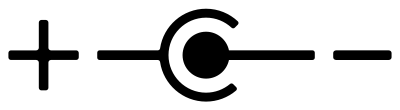 center/inside is negative (-), outside is positive (+)
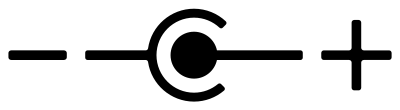 center/inside is positive (+), outside is negative (-)
If you see power given in watts (symbol W), that's the voltage multiplied by the amperage.
Be particularly careful with voltage and polarity. Getting those wrong could damage your device if it has no internal protection against it.
The voltage, amperage and polarity should be clearly marked on the power supply, and on the device. If they're not on the device itself, check the manual, or (for Yamaha products) find an image of the power supply the manufacturer suggested you use. As for the size of the jack and plug, that's more of a trial-and-error thing. But to save you all this effort…
Table of power supply requirements
| Manufacturer | Devices | Voltage | Polarity | Size |
|---|---|---|---|---|
| Roland | SC-7 (300mA)[1] SC-88VL (800mA)[2] JV-1010 (430mA)[3] |
9V |  center negative center negative
|
??mm (2.1mm works, 2.5mm works) |
| Yamaha | QY70 CBX-K1XG PSR-350 |
12V |  center positive center positive
|
??mm |
Units with AC power input
Units using AC (alternating current) for its power delivery typically have their power drawn directly from mains (in other words, the power outlet on your wall/extender). They typically have a built-in transformer section whose entire duty is to take in the raw AC out of the wall and convert it into clean direct current (DC) for the synthesizer circuitry to use without issue.
Typically, AC units are considered more dangerous than DC units. There are a few reasons for this: on one hand is due to DC units containing the transformer outside the synthesizer, meaning it can be replaced with newer, more efficient parts with ease, whereas AC units would require a complete rebuild of the transformer section, often meaning replacing capacitors and other components. On the other hand, DC units always expect the same input voltage and amperage, which can be typically provided no matter what the standard output is at the wall, whereas AC units may care about being specifically configured to a region's output voltage and frequency. In short, there is way more potential for things to potentially go wrong with AC units if you're not aware of the circumstances at play, and if they do go wrong the consequences could be orders of magnitude more fatal as opposed to DC units.
Hard-wired units
If your unit has a power cable that you cannot detach, that means it has a hard-wired cable. You are not able to remove the cable unless you modify the unit and fit a custom power connector inside, which, for the record, we cannot recommend as a safe alternative to using a transformer/adapter. The other annoyance is that, in regions that output a compatible voltage, but use a different plug standard (such as a UK-manufactured Roland U-220 being used in Germany), an adaptor is required anyway.
Examples
Please note: Units that are hard-wired are very likely to be permanently configured to a specific input voltage and/or frequency. Therefore it is NOT recommended to plug any of these devices straight into your wall or via a simple travel adaptor, as doing so may lead to a nasty shock. Unless the configured voltage on the unit matches the output on your electrical sockets, don't do it. Please also note that some devices allow for users to easily reconfigure the expected input voltage by soldering wires in the transformer section. What that means is even if the unit is claiming to be a 250 V unit, it may have been reconfigured to accept 120 V, and vice versa. It is heavily recommended that, if you are buying one of these devices, that communication is established with the seller to establish what the current expected standard is, and if it can be reconfigured for your region, or checking inside the unit to confirm what the expected input standard is.
Some ways around this:
- You may opt to use a step-down or a step-up transformer, depending on where the device came from and where you're trying to use it (250v to 120v would be a step down, 120v to 250v would be a step up). This typically is a last resort only used if a device cannot be reconfigured.
- Modify the power supply's intake to match what your outlets supply - for example, modifying a Japanese Roland SC-88 Pro, which typically expects a 100V 60hz input, to use European 250 50hz loads instead, by rewiring a connection in the transformer.
- If the option is available, obtaining a closely-related device that uses DC input instead is a great way around this - for example, the Roland SC-88 VL is a smaller variant of the Roland SC-88, it retains all the features, but removes some front panel controls, however it also uses a 9V DC input like the SC-55 before it, as opposed to a hard-wired power lead.
IEC 60320 devices, or in other words kettle leads (3-pin) and figure-8 leads (2-pin)
In some cases, a device leaves the power lead issue up to the user - these are sometimes hard-wired to a specific voltage inside the transformer, but are more commonly configured as "universal", meaning it can accept any territories' standard input voltage and frequency.
Kettle leads (IEC 60320 Type C13/C14)

- Kettle leads
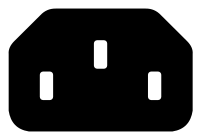 are 3-pin cables, with 2 prongs on either side of the plug, and one higher prong in the middle. You would typically see this used in desktop PC power supplies, kitchen appliances, guitar amplifiers, and more.
Examples
- The Roland JV-1080 features one on the rear of the unit with all the other connectors
- The Roland XV-5080 does the same, and also sports universal power, meaning you can use it in any region and it'll work directly off the wall.
- The Yamaha Motif ES keyboards happily showcase their 3-pin connector where the other cables go.
Figure-8 leads (IEC 60320 Type C7/C8)

- Figure-8 leads
 are comparatively much smaller and only feature 2 prongs instead of 3. The female end looks like the number 8, hence the name. Typically found on newer home electronics, such as TVs, or game consoles such as newer Xbox consoles or the Playstation 3, 4 and 5.
Examples
- The Roland-ED SC-8850 has a 2-pin power connector on the back - this is universal and will work in any region quite happily.
Non-standard AC power inputs
Rarely you may encounter a device asking for an less common power input standard.
Examples
- The Alesis S4, Alesis S4 Plus & Alesis QSR - The module version of the Alesis Quadrasynth/QS modules all use the same 4-pin, 9-volt AC connector for its power input. Although it is AC, because no outlet outputs 9 volt AC directly, a step-down adapter is required. Luckily, that is exactly what all power adapters designed for use with these modules do, plugging into an outlet wall-wart style, and outputting a clean, 9-volt AC signal, which typically is rated at 2 amps.
- The Roland TD-7,[4] Roland SC-33,[5] and BOSS DR-330,[6] all take 12V AC input, instead of the more common 9V DC input that modules like this typically use.
References
- ↑ Roland SC-7 Owner's Manual, page 40.
- ↑ Roland SC-88VL Owner's Manual, page 90.
- ↑ Roland JV-1010 Owner's Manual, page 89.
- ↑ Roland TD-7 Owner's Manual, page 167.
- ↑ Roland SC-33 Owner's Manual, page 106.
- ↑ BOSS DS-330 Owner's Manual, page 108.